
-96%

Elementor Pro Activator 1.0.3
Original price was: 59.00 $.1.95 $Current price is: 1.95 $.
- INR: ₹ 179.42
- AUD: 2.77 $
- EUR: 1.68 €
- GBP: 1.46 £

WooCommerce Notification 1.4.7
Original price was: 54.99 $.1.95 $Current price is: 1.95 $.
- INR: ₹ 179.42
- AUD: 2.77 $
- EUR: 1.68 €
- GBP: 1.46 £
| Version: | 1.4.7 |
|---|---|
| Updated: | Jun 06, 2022 |
| Developer Live Preview: | Codecanyon |
Description
WooCommerce Notification
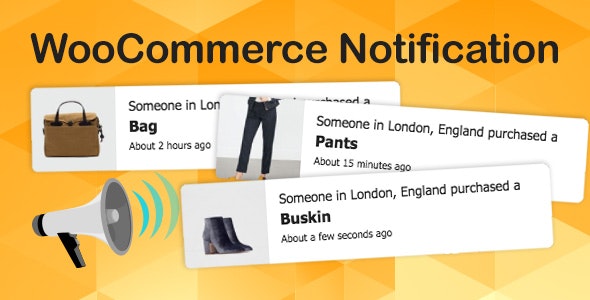
WooCommerce Notification displays recent orders on your storefront. Its the online equivalent of a busy store and shows prospective customers that other people are buying your products.
You can set up to display recent WooCommerce Notification orders.
Or if your store is new and there are not many things to show, you can create virtual orders to display from a list of customer names, addresses and selected items.
By displaying orders on front-end the plugin will create a social proof of a busy store with many customers and orders.
Creating a sense of urgency for visitors, urge them to purchase products. Also by select products to display, you can introduce your new products.
Try the Demo | Documents | Pro Version | Facebook group
- Increase conversion rate by highlighting other customers that have bought products.
- Display orders in real time for buyer validation and social proof!
- Create a sense of urgency for visitors, and expose new products!
IMPORTANT NOTICE
- Plugin works based on WooCommerce Notification.
- It is released on WordPress.org and you can use plugin as free to build themes for sale.
WooCommerce Notification FEATURES
- Display recent WooCommerce orders: the plugin will take the information about WooCommerce Notification to display.
- This is the “real order” options. You can select a time to pick up orders. In the last 30 days for example.
- Display virtual orders: fill in a list of customer name and address. Then select to display sale notification of selected products, selected categories, latest product, recently viewed product.
- Desktop: display order notification pop-ups on desktop.
- Mobile: display order notification pop-upson mobile.
- Multiple messages: the plugin allows you to add many different messages on the pop-up and provide shortcodes to display necessary information.
- Shortcode: there are 8 shortcodes for you to display information on pop-ups.-{first_name}: customer’s first name.-{city}: billing country.-{state}: billing state.-{country}: billing country.-{product}: product title.-{product_with_link}: product title with link
-{time_ago}: the purchased time
-{custom}: custom shortcode
-{number}: display a random number in a selected range.
- Current product: in single product pages, the plugin will display on sale notification of the current product or products in the same categories.
- Background color: change the background color of the pop-up.
- Templates: the plugin included 22 templates for you to change the front-end style to fit with your web design.
- Position: select the pop-up position on front-end bottom left, bottom right, top left and top right.
- Image Position: select to display the product image on the left or right side of the pop-up.
- Border-radius: select the border radius of the pop-up.
- Appear/disappear effect: choose the appear/disappear effect of the sale notification pop-up.
- Custom CSS: an option allows you to enter your own CSS code to change the front-end of the notification pop-up.
- AJAX loading: Using AJAX to load pop-up. The pop-up will be loaded after your site finish loading and will not affect your site loading speed.
- Easy to use
PRO VERSION
- All features from the free version.
- 6 months of Premium support.
- Unlimited products: With the free version, you are limited by 2 products at max.
- Time settings: unlock the time settings.
- Loop: display many sale notifications in each page loading.
- Loop by session: Set number of notifications per visitor session so that delay between notifications still work when a visitor move to other page of your website
- Initial delay: select the delay time for the pop-up to appear.
- Next time display: select the delay time between each pop-up.
- Display time: the time each pop-up appear on front-end.
- Sound: display a notification sound along with pop-up.
- Assign pages: select pages where you want to display the sale pop-ups.
- Report: the report option helps the system stores information when visitors click on the notification. Then the admin site could be a statistic of number clicks and analysis fluctuation sales. Report system allows to statistic number clicks by date or by-product.
- Auto update: with purchase code from Envato you can set the plugin to auto-update.
- GET PRO VERSION or http://codecanyon.net/item/woocommerce-notification-boost-your-sales/16586926
MAY BE YOU NEED
Email Template WooCommerce Notification: Customize WooCommerce emails to make them more beautiful and professional after only several mouse clicks
Product Variations Swatches for WooCommerce Notification: Professional and beautiful colors, buttons, images, variation images and radio variations swatches
Orders Tracking for WooCommerce Notification: Import orders tracking number and send tracking info to customers
Abandoned Cart Recovery For WooCommerce Notification: Capture abandoned carts & send reminder emails to customers.
Import Shopify to WooCommerce: Import Shopify to WooCommerce Notification help you import all products from your Shopify store to WooCommerce Notification
Customer Coupons for WooCommerce: Display coupons on your website
Virtual Reviews for WooCommerce: Virtual Reviews for WooCommerce Notification helps generate virtual reviews, display canned reviews for newly created store
Thank You Page WooCommerce Notification: Customize your “Thank You” page and give coupons to customers after a successful order
Sales Countdown Timer: Create a sense of urgency with a countdown to the beginning or end of sales, store launch or other events
EU Cookies Bar: A very simple plugin which helps your website comply with Cookie Law
Lucky Wheel for WooCommerce Notification: Offer customers to spin for coupons by entering their emails.
WordPress Lucky Wheel: WordPress Lucky Wheel gives you the best solution to get emails address from visitors of your WordPress website
Advanced Product Information for WooCommerce Notification: Display more intuitive information of products such as sale countdown, sale badges, who recently bought products, rank of products in their categories, available payment methods…
LookBook for WooCommerce Notification: Create beautiful Lookbooks, Shoppable with Product Tags
Photo Reviews for WooCommerce Notification: Allow posting reviews include product pictures, review reminder, review for coupons.
Product Builder for WooCommerce Notification: Allows your customers to build a full product set from small parts step by step.
The plugin works base on WooCommerce Notification with many useful features like compatible, email completed product, attributes filters.
Boost Sales for WooCommerce Notification: Increase profit on every single order with Up-selling and Cross-selling
Free Shipping Bar for WooCommerce: Use free shipping as a marketing tool, encourage customers to pay more for free shipping.
Multi Currency for WooCommerce: Switches to different currencies easily and accepts payment with only one currency or all currencies.
Coupon Box for WooCommerce: Subscribe emails for discount coupons
DOCUMENTATION
- Getting Started
PLUGIN LINKS
- Project Page
- Documentation
- Report Bugs/Issues
- WooCommerce Notification displays recent orders on your storefront. It’s the online equivalent of a busy store and shows prospective customers that other people are buying your products.
- Increase conversion rate by highlighting other customers that have bought products.
- Display orders in real time for buyer validation and social proof!
Create a sense of urgency for visitors, and expose new products!
FEATURES OF WOOCOMMERCE NOTIFICATION
DISPLAY RECENT ORDERS
The plugin takes information from recent orders of WooCommerce to display.
- Select orders to display: You can choose to display Complete, Processing, On hold, Canceled, Refunded, Pending payment or Failed orders.
- Order Time: Select time and display orders from that time until now.
- Exclude Products : Avoid the products you don’t want to appear on notifications.
- Out of stock products: The option allows you to select to display out of stock products on the notification or not.
DISPLAY FAKE ORDERS
Do you want to increase the sale of some specific products? Do you want to introduce some new product to customers? The plugin may help you with the fake orders feature.
- Create orders for selected products: Select some products and put in the needed information. The plugin will create fake orders for the selected products.
- Create orders for selected categories: If your store has too many products to select manually. This function will help you to select products to create fake orders of the product.
- Create orders with latest products: Create fake orders for the newest products. Help you to introduce new products to customers.
- Auto detects address: Auto detect customer address via IP (city, country) and create fake orders near them.
- Random purchase time: The plugin select a purchase time randomly between a time threshold selected by you.
- Virtual customer’s first name and address: Type in customers first name and address as you want. The plugin will mix it with Selected products/Selected categories/Latest products and random purchase time to create faker orders.
MULTIPLE WOOCOMMERCE NOTIFICATION MESSAGES
You can add and configure as many messages as you want. Each message will be displayed on a different single pop up.
- Shortcodes: Use the shortcodes to configure your messages. T he system will take off this information from your orders or create automatically.
{first_name} – Customer’s first name
{city} – Customer’s city
{state} – Customer’s state
{country} – Customer’s country
{product} – Product title
{product_with_link} – Product title with a link to the single product page
{time_ago} – Time after purchase
{custom} – Use custom shortcode - States for addresses in the USA: with the shortcode for states, now you can display addresses in the USA correctly.
Example: Someone in Chicago, Illinois, USA just purchased a Woo Ninja.
DESIGN
WooCommer Notification plugin provides a lot of options to help you configure the pop-up as you want.
- Select the pop-up background image: there are 3 background images to select now, it will be added very often.
- Configure the color of text, product name, and background.
- Border-radius: Configure the border radius of the pop-up.
- Available 4 pop-up positions, 2 product image positions.
- Enable/Disable the Close icon.
- Appearing and disappearing effects.
- Sound effect when pop-ups appear.
- Add your own custom CSS.
- Select the product image size, 3 options to choose.
- Clickable product image: Product images on pop up are now clickable. It will redirect to the single product page.
- Display parent product image: if a product variation does not have a product image, the plugin will display the parent product image instead.
- Display current product or products in the same category: plugin will display the product customers are viewing or products in the same category.
- Assign pages: Enable/Disable the plugin on Homepage/Checkout page/Cart page in settings. Other pages can be assigned with conditional tags.
- Show Notification from specific pages: You can use “conditional tags” option to show notification on a particular page depending on what conditions that page matches.
- Simply indicate ID or title of the page that you want to show notification. For Example, is_page(50) or is_page( array(50, 75) ) with page what IDs are 50 and 75 .
- Set the time to display notificationS, delay time showing, loop time.
OTHER
- Works on mobile: The plugin works perfectly on mobile and responsive devices.
- Save Logs: Save logs help system stores information when visitors click on the notification.
- Auto update: with purchase code from Envato you can set the plugin to auto-update.
- SPEED: By using Ajax technology notifications will be loaded after site load. The plugin won’t affect the loading speed of your site.
Easy to use: The plugin is designed with a friendly interface. It takes only a few minutes to set up with optimal default settings
FEATURES OF WOOCOMMERCE NOTIFICATION
DISPLAY RECENT ORDERS
The plugin takes information from recent orders of WooCommerce to display.
- Select orders to display: You can choose orders to display based on the order status. Included Complete, Processing, On hold, Canceled, Refunded, Pending payment or Failed orders.
- Order Time: Select time and display orders from that time until now.
- Exclude Products: Avoid the products you don’t want to appear on notifications.
- Out of stock products: The option allows you to select to display out of stock products on the notification or not.
DISPLAY FAKE ORDERS
Do you want to increase the sale of some specific products? Do you want to introduce some new product to customers? The plugin may help you with the fake orders feature.
- Create orders for selected products: Select some products and put in the needed information. The plugin will create fake orders for the selected products.
- Create orders for selected categories: If your store has too many products to select manually. This function will help you to select products to create fake orders of the product.
- Create orders with latest products: Create fake orders for the newest products. Help you to introduce new products to customers.
- Auto-detects address: Auto detect customer address via IP (city, country) and create fake orders near them.
- Random purchase time: The plugin select a purchase time randomly between a time threshold selected by you.
- Virtual customer’s first name and address: Type in customers first name and address as you want. Then the plugin will mix it with Selected products/Selected categories/Latest products and random purchase time to create faker orders.
MULTIPLE WOOCOMMERCE NOTIFICATION MESSAGES
You can add and configure as many messages as you want. Each message will be displayed on a different single pop up.
- Shortcodes: Use the shortcodes to configure your messages. The system will take off this information from your orders or create automatically.
{first_name} – Customer’s first name
{city} – Customer’s city
{state} – Customer’s state
{country} – Customer’s country
{product} – Product title
{product_with_link} – Product title with a link to the single product page
{time_ago} – Time after purchase
{custom} – Use custom shortcode - States for addresses in the USA: with the shortcode for states, now you can display addresses in the USA correctly.
Example: Someone in Chicago, Illinois, USA just purchased a Woo Ninja.
DESIGN
WooCommer Notification plugin provides a lot of options to help you design the notification pop-up as you want.
- 22 built-in templates: The plugin provides 22 pop-up templates for you to change the front-end of WooCommerce Notification. So you can make the pop-up fit with your website design.
- Rounded/Square pop-up: select if you want to round the pop-up or display it as a rectangle.
- Pop-up positions: There are 4 positions to display the pop-up.
- Close button: The close button allows customers to close the pop-up. And you can select a time for the pop-up to re-appear.
- Swift to close on mobile: To make it easier to close the pop-up on mobile devices, the plugin allows customers to swift the pop-up to close.
- Appearing and disappearing effects: You can select the appearing and disappearing effect of pop-ups.
- Sound effect when pop-ups appear: Display a sound along with the pop-up when appearing. This option requires at least one action of users with your site.
- Custom CSS: The plugin provides a Custom CSS field, allows you to add your own CSS code and change the front-end of the plugin.
- Clickable product image: Product images on pop up are now clickable. It will redirect to the single product page.
- Display parent product image: If a product variation does not have a product image, the plugin will display the parent product image instead.
- Display current product or products in the same category: the plugin will display the product customers are viewing or products in the same category.
- Assign pages: Enable/Disable the plugin on the Homepage/Checkout page/Cart page in settings. With other pages, you can use the “conditional tags” option to select the page you want to display the pop-up.
TIME SETTINGS
- Loop: The loop option allows you to display multiple pop-ups on each site loading time.
- Loop by session: the plugin will display a selected quantity of pop-up in session time.
- Next time display: You can select the delay time between each pop-up.
- Display time: An option allows you to select the display time of each pop-up.
- Delay time: You can select the delay time for the first pop-up to appear after site loading.
OTHER
Works on mobile: The plugin works perfectly on mobile and responsive devices.
Save Logs: Save logs help system stores information when visitors click on the notification.
Then the site admin could have a statistic of number clicks and analysis fluctuation sales. Report system allows to statistic number clicks by date or by product name.
See users interact with your notifications in real-time: With featured save logs, admin site will learn more about attitudes and behavior of customer for the product shown in the notification.
Auto-update: By authenticate your Envato purchase, you can auto-update the plugin during the support time.
SPEED: Because of using Ajax technology notifications will be loaded after site load. Then the plugin won’t affect the loading speed of your site.
Easy to use: The plugin is designed with a friendly interface. So it takes only a few minutes to set up with optimal default settings
Reviews (0)
Only logged in customers who have purchased this product may leave a review.
BEFORE BUYING
OUR BUSINESS HOURS ARE MONDAY TO FRIDAY FROM 10:00 AM TO 6:00 PM (GMT-5.30), ANY REQUEST MADE OUTSIDE THESE HOURS WILL BE ANSWERED UNTIL NEXT BUSINESS DAY. UPDATES CAN TAKE 24 TO 48 HOURS. SUPPORT PROVIDED IS FOR PRODUCT INSTALLATION. PLEASE BE AWARE OF POSSIBLE TIME ZONE DIFFERENCES WHEN WAITING FOR OUR REPLY.
Updates:
- To receive an email notification when products have been updated, be sure to click on the notification button below the product image.
- On a standalone item, you will get lifetime updates. If you choose a membership, updates and access to your items will be available as long as your membership is active.
- We regularly update products as soon as we are notified about an update, we go and download it from the author and update it on our site, but In case the current version of the product is not the latest, You can request an update for the product.
- We send regular emails advising when products have been updated so please be sure to provide an active email address when you sign up.
Support:
- If you have any question or need help installing products purchased on our website, please don’t hesitate to contact us.
- Please note that we are not developers of the provided products, so our technical support capabilities are limited. We do not change product functionality and do not fix developer bugs.
- We don’t offer any additional author services like author’s support and license keys and we are not affiliated or in any way related to third-party developers or trademark owners. If you want to know more about GNU / GPL License, CLICK HERE.
Abuse Warning:
- Please note that accounts are monitored and redistribution of our content is not allowed and will not be tolerated.
- Our system may detect patterns of downloading items from non-end users outside of our fair use policy.
- Any violation of our terms of use will result in permanent account suspension and no refunds will be issued.
- Subscriptions can be cancelled at any time from your account control panel.
- Downloads are strictly subject to our fair use policy.
For more information please read FAQs & Terms of Use.
ACTIVATION AND NOTE
CONTENT AVAILABLE ONLY FOR MEMBERSHIP.
Related products
Bulk Download WooCommerce Extension 1.2.13
Original price was: 48.99 $.1.95 $Current price is: 1.95 $.- INR: ₹ 179.42
- AUD: 2.77 $
- EUR: 1.68 €
- GBP: 1.46 £

Request a Quote for WooCommerce 2.4.0
Original price was: 89.99 $.1.95 $Current price is: 1.95 $.- INR: ₹ 179.42
- AUD: 2.77 $
- EUR: 1.68 €
- GBP: 1.46 £
Sensei Paid Courses Woocommerce WP Pro 3.11.1
Original price was: 58.99 $.1.95 $Current price is: 1.95 $.- INR: ₹ 179.42
- AUD: 2.77 $
- EUR: 1.68 €
- GBP: 1.46 £

WooCommerce Chat Bot 1.0.5
Original price was: 66.99 $.1.95 $Current price is: 1.95 $.- INR: ₹ 179.42
- AUD: 2.77 $
- EUR: 1.68 €
- GBP: 1.46 £

Woocommerce Currency Switcher2.3.8
Original price was: 68.99 $.1.95 $Current price is: 1.95 $.- INR: ₹ 179.42
- AUD: 2.77 $
- EUR: 1.68 €
- GBP: 1.46 £
Woocommerce Product Table 2.8.7
Original price was: 58.99 $.1.95 $Current price is: 1.95 $.- INR: ₹ 179.42
- AUD: 2.77 $
- EUR: 1.68 €
- GBP: 1.46 £
WooCommerce Software Add-on 1.7.19
Original price was: 58.99 $.1.95 $Current price is: 1.95 $.- INR: ₹ 179.42
- AUD: 2.77 $
- EUR: 1.68 €
- GBP: 1.46 £
YITH WooCommerce Customize My Account Page 3.10.0
Original price was: 59.99 $.1.95 $Current price is: 1.95 $.- INR: ₹ 179.42
- AUD: 2.77 $
- EUR: 1.68 €
- GBP: 1.46 £


Reviews
There are no reviews yet.